Part IV — Prompt Engineering & RAG Fundamentals
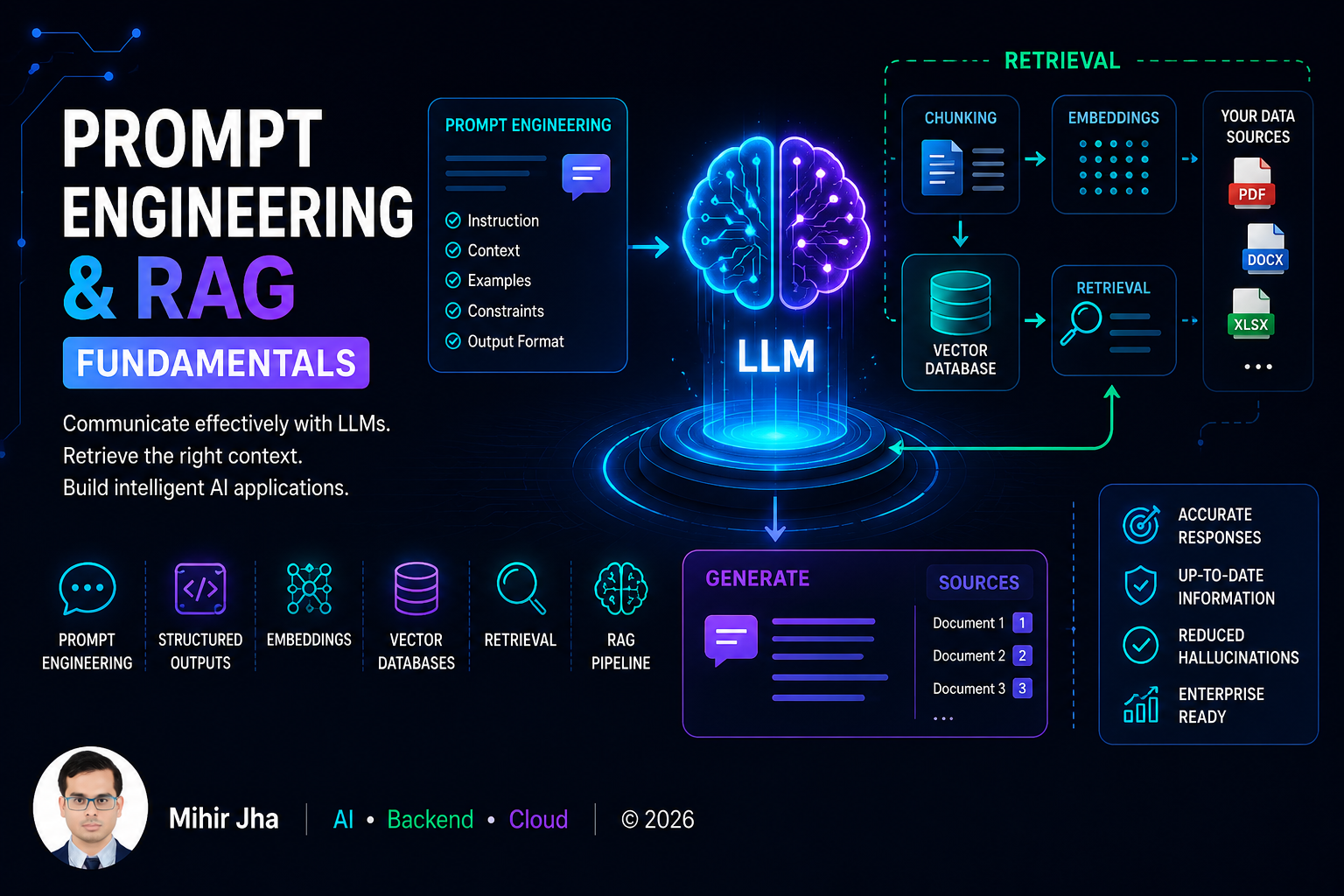
Learn how to effectively interact with Large Language Models (LLMs), design reliable prompts, and build foundational Retrieval-Augmented Generation (RAG) applications using enterprise knowledge.
📖 Overview
Large Language Models (LLMs) have fundamentally changed how humans interact with software. However, building reliable AI applications requires far more than simply sending prompts to an LLM.
This module introduces the core techniques required to build LLM-powered applications, starting with Prompt Engineering and progressing toward foundational Retrieval-Augmented Generation (RAG).
You'll learn how to design effective prompts, work with structured outputs and tool calling, understand embeddings and vector databases, process documents, perform similarity search, and assemble the components of a basic RAG pipeline.
The module also introduces practical LLM application development and deployment concepts, including structured output parsing, RAG pipeline components, enterprise Generative AI application architecture, and deploying AI applications with Gradio and Flask.
Frameworks such as LangChain and LlamaIndex may be used in selected implementation examples where they help explain a concept. Dedicated framework architecture, abstractions, comparisons, and selection are covered later in Part VIII — AI Engineering Frameworks & Tooling.
🎯 Learning Outcomes
After completing this module, you will be able to:
- Understand how Large Language Models interpret prompts
- Design effective prompts for different AI tasks
- Apply Zero-shot, One-shot, and Few-shot prompting techniques
- Apply advanced prompt engineering techniques
- Understand Chain-of-Thought (CoT) and ReAct prompting
- Generate structured outputs using JSON and schemas
- Parse structured LLM responses
- Understand Function Calling and Tool Calling concepts
- Understand the basic components of LLM applications
- Generate and use embeddings for semantic search
- Understand Vector Databases and similarity search
- Understand document processing and vectorization
- Design effective document chunking strategies
- Understand RAG pipeline components
- Build retrieval and generation pipelines
- Build a foundational RAG application
- Evaluate basic RAG systems
- Understand enterprise Generative AI application architecture
- Build simple AI application interfaces using Gradio
- Expose AI capabilities through Flask REST APIs
- Understand the difference between AI UI layers and AI backend services
🧭 Learning Journey
The module follows a progressive path:
flowchart LR
    A["Prompt Engineering"] --> B["Prompt Design"]
    B --> C["Structured Outputs"]
    C --> D["Function & Tool Calling"]
    D --> E["Embeddings"]
    E --> F["Document Processing"]
    F --> G["Vector Databases"]
    G --> H["Similarity Search"]
    H --> I["RAG Components"]
    I --> J["Retrieval"]
    J --> K["Generation"]
    K --> L["RAG Application"]
    L --> M["RAG Evaluation"]
    M --> N["Enterprise AI Architecture"]
    N --> O["Gradio"]
    O --> P["Flask API"]
The objective is to move from understanding LLM interaction to building and exposing a complete foundational RAG application.
🛣️ Recommended Learning Path
The complete Part IV learning path is:
🧠 From Prompt to Application
A modern LLM application begins with a user request and progressively adds structure and context.
flowchart TD
    A["User Request"] --> B["Prompt"]
    B --> C["LLM"]
    C --> D["Generated Response"]

    B --> E["Structured Output"]
    E --> F["Application Logic"]

    B --> G["Tool / Function"]
    G --> F

    B --> H["Retrieval"]
    H --> I["Relevant Context"]
    I --> C
This module focuses on understanding these building blocks before combining them into larger AI application architectures.
Prompt Engineering
🔹 Prompt Engineering Fundamentals
A prompt is more than a question.
A well-designed prompt can define:
A useful conceptual structure is:
flowchart LR
    A["Role"] --> B["Task"]
    B --> C["Context"]
    C --> D["Constraints"]
    D --> E["Output Format"]
    E --> F["LLM Response"]
🔹 Prompt Design Patterns
Different tasks require different prompting strategies.
Common patterns include:
| Pattern | Primary Purpose |
|---|---|
| Zero-shot | Solve without examples |
| One-shot | Provide one example |
| Few-shot | Provide multiple examples |
| Role prompting | Establish behavior or expertise |
| Instruction prompting | Define the task |
| Structured prompting | Control output format |
| Decomposition | Break complex tasks into steps |
| ReAct | Combine reasoning with actions |
The objective is not to memorize patterns, but to understand when each pattern is useful.
🔹 Zero-shot, One-shot & Few-shot
The progression can be visualized as:
flowchart LR
    A["Zero-shot<br/>No Examples"] --> B["One-shot<br/>One Example"]
    B --> C["Few-shot<br/>Multiple Examples"]
    C --> D["Improved Task Guidance"]
The amount of example information should be determined by the task rather than added automatically.
🔹 Chain-of-Thought
Chain-of-Thought prompting is used to encourage structured reasoning for tasks that benefit from intermediate reasoning.
Conceptually:
In production systems, reasoning strategies should be evaluated based on:
The goal is improved task performance, not simply longer responses.
🔹 ReAct
ReAct combines reasoning with actions.
A simplified conceptual flow is:
sequenceDiagram
    participant U as User
    participant A as AI Agent
    participant T as Tool
    participant O as Observation

    U->>A: Request
    A->>A: Determine next action
    A->>T: Execute action
    T->>O: Return result
    O->>A: Observation
    A->>A: Determine next step
    A->>U: Response
This introduces the foundation for later AI Agent concepts without turning Part IV into an Agent module.
Structured LLM Outputs
🔹 Structured Outputs
LLMs often need to communicate with software systems rather than directly with humans.
Instead of:
an application may require:
The application can then validate and consume the result.
🔹 Structured Output Pipeline
flowchart LR
    A["User Input"] --> B["Prompt"]
    B --> C["LLM"]
    C --> D["Structured Output"]
    D --> E["Schema Validation"]
    E --> F["Application Logic"]
This establishes an important production principle:
LLM output should be treated as application data that requires validation.
Function Calling & Tool Calling
🔹 Function Calling
Function calling allows an LLM application to request execution of a predefined function.
sequenceDiagram
    participant U as User
    participant L as LLM
    participant A as Application
    participant T as Function / Tool

    U->>L: User request
    L->>A: Tool call request
    A->>T: Execute function
    T->>A: Tool result
    A->>L: Tool result
    L->>U: Final response
The important boundary is:
The LLM should not automatically be trusted with unrestricted application capabilities.
Embeddings
🔹 Embeddings in Practice
Embeddings convert text into numerical representations that capture semantic relationships.
Conceptually:
For example:
The exact vector values depend on the embedding model.
🔹 Semantic Similarity
Semantically related text tends to have vectors that are closer according to the selected similarity measure.
flowchart LR
    A["Text A"] --> B["Embedding Model"]
    B --> C["Vector A"]

    D["Text B"] --> E["Embedding Model"]
    E --> F["Vector B"]

    C --> G["Similarity"]
    F --> G

    G --> H["Semantic Relationship"]
Embeddings provide the foundation for semantic retrieval.
Document Processing
🔹 Document Processing & Vectorization
Enterprise knowledge usually begins as documents:
A foundational processing pipeline is:
flowchart TD
    A["Enterprise Documents"] --> B["Document Loading"]
    B --> C["Text Extraction"]
    C --> D["Cleaning"]
    D --> E["Chunking"]
    E --> F["Embedding"]
    F --> G["Vector Store"]
The quality of the downstream RAG system depends heavily on the quality of this preprocessing pipeline.
Document Chunking
🔹 Chunking Strategies
Large documents are usually divided into smaller units before embedding.
A good chunking strategy should consider:
- Semantic boundaries
- Chunk size
- Context preservation
- Overlap
- Document structure
- Metadata
🔹 Basic Chunking Flow
flowchart LR
    A["Large Document"] --> B["Split"]
    B --> C["Chunk 1"]
    B --> D["Chunk 2"]
    B --> E["Chunk 3"]
    B --> F["Chunk N"]

    C --> G["Embedding"]
    D --> G
    E --> G
    F --> G
Advanced retrieval and chunking optimization are intentionally reserved for Part V.
Vector Databases
🔹 Vector Database Fundamentals
A vector database stores and retrieves vector representations.
A simplified architecture is:
flowchart TD
    A["Document"] --> B["Embedding Model"]
    B --> C["Vector"]

    C --> D["Vector Database"]

    E["User Query"] --> F["Query Embedding"]
    F --> D

    D --> G["Similar Vectors"]
    G --> H["Relevant Documents"]
Common capabilities include:
- Vector storage
- Similarity search
- Metadata storage
- Filtering
- Retrieval
Specific technologies such as ChromaDB can be used in examples, but the underlying vector-database concepts remain framework and vendor independent.
Similarity Search
🔹 Similarity Search Techniques
The goal of similarity search is to find vectors that are semantically related to the query vector.
Conceptually:
A simplified retrieval flow:
flowchart LR
    A["User Query"] --> B["Query Embedding"]
    B --> C["Vector Search"]
    C --> D["Similarity Scores"]
    D --> E["Top Results"]
The exact similarity function and indexing strategy depend on the vector database and retrieval implementation.
RAG Fundamentals
🔹 What Is RAG?
Retrieval-Augmented Generation combines:
Instead of relying only on the knowledge stored in model parameters:
RAG adds external knowledge:
🔹 RAG Pipeline Components
A foundational RAG system contains:
flowchart TD
    A["Enterprise Documents"] --> B["Document Processing"]
    B --> C["Chunking"]
    C --> D["Embedding Model"]
    D --> E["Vector Database"]

    F["User Query"] --> G["Query Embedding"]
    G --> E

    E --> H["Retrieved Context"]
    H --> I["Prompt Construction"]
    I --> J["LLM"]
    J --> K["Generated Response"]
This is the core architecture that the reader should understand before moving into advanced RAG.
Retrieval & Generation Pipeline
🔹 Retrieval Pipeline
The retrieval side is responsible for finding relevant information.
flowchart LR
    A["User Query"] --> B["Query Processing"]
    B --> C["Query Embedding"]
    C --> D["Vector Search"]
    D --> E["Retrieved Documents"]
🔹 Generation Pipeline
The generation side combines the query and retrieved context.
flowchart LR
    A["User Query"] --> C["Prompt"]
    B["Retrieved Context"] --> C
    C --> D["LLM"]
    D --> E["Generated Answer"]
🔹 Complete RAG Pipeline
flowchart LR
    A["User Query"] --> B["Retrieval"]
    B --> C["Relevant Context"]
    C --> D["Prompt"]
    A --> D
    D --> E["LLM"]
    E --> F["Response"]
Vector Databases in RAG
A vector database provides the retrieval layer of a basic RAG architecture.
                 RAG SYSTEM
                     │
       ┌─────────────┴─────────────┐
       ↓                           ↓
  Knowledge Base               User Query
       ↓                           ↓
   Chunking                  Query Embedding
       ↓                           ↓
   Embeddings                     │
       ↓                           │
       └──────→ Vector DB ←────────┘
                     ↓
              Similarity Search
                     ↓
              Retrieved Context
                     ↓
                    LLM
                     ↓
                 Response
The objective is to understand the role of the vector database rather than become dependent on a particular database technology.
Building Your First RAG Pipeline
A simple RAG implementation can be viewed as:
flowchart TD
    A["Load Documents"] --> B["Split Documents"]
    B --> C["Create Embeddings"]
    C --> D["Store Vectors"]

    E["User Question"] --> F["Create Query Embedding"]
    F --> G["Retrieve Similar Documents"]
    G --> H["Build Prompt"]
    E --> H
    H --> I["Generate Answer"]
A framework implementation may use LangChain or LlamaIndex to compose these steps.
The important learning objective is to understand what the framework is doing underneath.
RAG Evaluation Fundamentals
A RAG system should be evaluated at multiple stages.
flowchart TD
    A["RAG System"] --> B["Retrieval Evaluation"]
    A --> C["Generation Evaluation"]

    B --> D["Relevance"]
    B --> E["Recall"]

    C --> F["Correctness"]
    C --> G["Groundedness"]
    C --> H["Answer Quality"]
A basic evaluation framework should consider:
Advanced RAG evaluation techniques belong in Part V.
Enterprise Generative AI Application Architecture
A foundational enterprise Generative AI application can be represented as:
flowchart TD
    A["Enterprise User"] --> B["Application"]
    B --> C["LLM Orchestration"]

    C --> D["Prompt"]
    C --> E["Retrieval"]
    C --> F["Tools"]

    E --> G["Enterprise Knowledge"]
    G --> H["Vector Database"]

    D --> I["LLM"]
    E --> I

    I --> J["Response"]
    J --> B
    B --> A
At this stage, the focus is on understanding the major application building blocks.
Advanced enterprise architecture, agent orchestration, security, observability, and large-scale deployment are covered in later Parts.
Deploying AI Applications
Part IV concludes by moving from AI concepts and RAG pipelines toward simple application delivery.
There are two different deployment/application patterns covered in the final chapters:
flowchart LR
    A["AI Capability"] --> B["Gradio"]
    A --> C["Flask"]

    B --> D["Interactive AI UI"]
    C --> E["AI REST API"]

    D --> F["Human User"]
    E --> G["Enterprise Application"]
The important distinction is:
Gradio
  ↓
Human-facing AI interface
Prototype / Demo / Workbench

Flask
  ↓
Programmatic AI interface
REST API / Backend Service / AI Microservice
Deploying AI Applications with Gradio
A simple AI application can expose the model pipeline through an interactive user interface.
flowchart LR
    A["User"] --> B["Gradio Interface"]
    B --> C["Application Logic"]
    C --> D["LLM / RAG Pipeline"]
    D --> C
    C --> B
    B --> A
This demonstrates the transition:
Gradio is particularly useful for:
- AI prototypes
- Interactive demonstrations
- Chat interfaces
- Model experimentation
- RAG workbenches
- Internal AI tools
- Rapid validation of AI workflows
Gradio is treated here as an application interface and deployment mechanism rather than as the subject of a dedicated framework track.
Deploying AI Applications with Flask
Flask provides a lightweight way to expose Python-based AI capabilities through REST APIs.
A typical architecture is:
flowchart TD
    A["Enterprise Client"] --> B["Flask API"]

    B --> C["Application Service"]

    C --> D["RAG Service"]
    C --> E["LLM Provider"]
    C --> F["Tool Services"]

    D --> G["Embedding Provider"]
    D --> H["Vector Database"]

    D --> I["Enterprise Knowledge"]
The key architectural boundary is:
The Flask chapter focuses on:
- REST APIs for AI applications
- Request and response contracts
- API versioning
- Structured validation
- RAG APIs
- LLM APIs
- Streaming responses
- Error handling
- Health and readiness endpoints
- Authentication and authorization concepts
- Observability
- AI service testing
- Docker deployment
- Production WSGI serving
- Flask as an AI microservice
- Flask integration with enterprise applications
Flask is therefore positioned as an AI backend/API layer, rather than as a generic web-development topic.
Gradio vs Flask
The distinction between the two deployment approaches is important.
| Capability | Gradio | Flask |
|---|---|---|
| Interactive AI UI | Excellent | Not primary purpose |
| AI Prototype | Excellent | Possible |
| Chat UI | Excellent | Requires frontend |
| AI Workbench | Excellent | Not primary purpose |
| REST API | Possible | Strong fit |
| Backend Service | Limited focus | Strong fit |
| AI Microservice | Possible | Strong fit |
| Enterprise Integration | Moderate | Strong |
| React / Mobile Integration | Possible | Natural |
| API Versioning | Limited focus | Natural |
A common enterprise architecture may use both:
flowchart TD
    A["Shared AI Capability Layer"] --> B["Gradio"]
    A --> C["Flask"]

    B --> D["AI Engineer / Internal User"]
    C --> E["Enterprise Application"]
The same AI capability can therefore be exposed through different interfaces without making the interface layer the AI capability itself.
🧩 Concept → Implementation → Application
Throughout Part IV, the preferred learning pattern is:
flowchart LR
    A["Concept"] --> B["Framework-Agnostic Explanation"]
    B --> C["Python Implementation"]
    C --> D["Optional Framework Example"]
    D --> E["Application"]
For example:
The framework is therefore an implementation aid, not the subject of the chapter.
🔗 Framework Boundary
Frameworks may appear in Part IV when they help explain implementation.
Examples include:
- LangChain
- LlamaIndex
- LCEL
- ChromaDB
- Hugging Face libraries
- LLM provider SDKs
- Gradio
However, Part IV does not attempt to comprehensively teach these frameworks.
The dedicated framework track appears later:
Part VIII — AI Engineering Frameworks & Tooling
This keeps the learning progression framework-independent.
🏢 Enterprise Use Cases
Foundational LLM and RAG techniques can support:
- Enterprise Knowledge Assistants
- Internal Documentation Search
- Intelligent Document Q&A
- Customer Support Assistants
- Research Assistants
- Code Assistants
- Enterprise Search
- Compliance Knowledge Assistants
- Financial Knowledge Assistants
- Internal AI Platforms
- AI-powered application backends
- Enterprise AI APIs
A common pattern is:
flowchart LR
    A["Enterprise User"] --> B["AI Application"]
    B --> C["Retrieval"]
    C --> D["Enterprise Knowledge"]
    D --> C
    C --> E["LLM"]
    E --> F["Grounded Response"]
    F --> B
    B --> A
🧭 Part IV Scope
Part IV intentionally focuses on the foundations of LLM application engineering.
Prompt Engineering
        ↓
Advanced Prompting
        ↓
Structured Outputs
        ↓
Function / Tool Calling
        ↓
Embeddings
        ↓
Document Processing
        ↓
Chunking
        ↓
Vector Databases
        ↓
Similarity Search
        ↓
RAG Components
        ↓
Retrieval
        ↓
Generation
        ↓
Foundational RAG
        ↓
Basic Evaluation
        ↓
Enterprise AI Architecture
        ↓
Application Interfaces
        ↓
Gradio
        ↓
Flask AI APIs
The goal is to give engineers enough understanding to move from:
to:
without prematurely introducing the complexity of advanced retrieval, agentic systems, or framework-specific architecture.
🚧 What Is Intentionally Reserved for Later Parts?
Part IV establishes the foundation.
The following areas are intentionally handled in later Parts.
Part V — Advanced Retrieval-Augmented Generation
Hybrid Search
Metadata Filtering
Parent-Child Retrieval
Multi-Vector Retrieval
Multi-Query Retrieval
Contextual Compression
Re-ranking
Graph RAG
SQL RAG
Knowledge Graphs
Agentic RAG
Advanced RAG Evaluation
Performance Optimization
Cost Optimization
Production RAG Architectures
Part VI — AI Agents
Agent Fundamentals
Agent Architecture
Planning
Reasoning
Memory
Tool Calling
Reflection
Self-Correction
Agent Evaluation
Observability
Security
Deployment
MCP
Part VII — Agentic AI & Multi-Agent Systems
Multi-Agent Systems
Supervisor Pattern
Hierarchical Agents
Swarm Intelligence
Collaborative Agents
Human-in-the-Loop
Long-Running Agents
Agentic RAG
A2A
Future Agent Protocols
Part VIII — AI Engineering Frameworks & Tooling
LangChain
LangGraph
LlamaIndex
Semantic Kernel
CrewAI
AutoGen
DSPy
Haystack
OpenAI SDK
Anthropic SDK
Google GenAI SDK
AI Framework Comparisons
This separation keeps Part IV focused and prevents the learning path from becoming framework-heavy too early.
📊 Part IV Architecture Summary
The complete conceptual progression can be summarized as:
flowchart TD
    A["Prompt Engineering"] --> B["Structured LLM Interaction"]

    B --> C["Function / Tool Calling"]

    C --> D["Embeddings"]

    D --> E["Document Processing"]

    E --> F["Chunking"]

    F --> G["Vector Database"]

    G --> H["Similarity Search"]

    H --> I["Retrieval"]

    I --> J["Context"]

    J --> K["Generation"]

    K --> L["RAG Application"]

    L --> M["RAG Evaluation"]

    M --> N["Enterprise AI Architecture"]

    N --> O["Gradio UI"]

    N --> P["Flask AI API"]
This represents the central learning journey of Part IV:
From interacting with an LLM to building, evaluating, and exposing a foundational enterprise AI application.
🧠 Production Perspective
The most important lesson from Part IV is that an LLM application is not simply:
A production-oriented AI application increasingly looks like:
flowchart TD
    A["User / Client"] --> B["Application Interface"]

    B --> C["Validation"]
    C --> D["Prompt / Application Logic"]

    D --> E["Retrieval"]
    D --> F["Tools"]
    D --> G["LLM"]

    E --> H["Enterprise Knowledge"]
    H --> I["Vector Database"]

    E --> G

    G --> J["Structured Response"]

    J --> K["Evaluation / Validation"]

    K --> L["Application Response"]
This foundation prepares the reader for the more advanced production architectures introduced later in the handbook.
📚 Part IV Chapter Map
01  Introduction to Prompt Engineering
02  Prompt Engineering Fundamentals
03  Advanced Prompt Engineering
04  Prompt Design Patterns
05  Zero-shot, One-shot & Few-shot Prompting
06  Chain-of-Thought Prompting
07  ReAct Prompting

08  Structured Outputs & Output Parsing
09  Function Calling & Tool Calling

10  Embeddings in Practice
11  Document Processing & Vectorization
12  Document Chunking Strategies

13  Vector Database Fundamentals
14  Similarity Search Techniques

15  RAG Pipeline Components
16  Retrieval & Generation Pipeline
17  Vector Databases in RAG
18  Building Your First RAG Pipeline
19  RAG Evaluation Fundamentals

20  Enterprise Generative AI Application Architecture

21  Deploying AI Applications with Gradio
22  Deploying AI Applications with Flask
What Comes Next?
Part IV establishes the foundation required for the next stage of the handbook.
Part V — Advanced Retrieval-Augmented Generation
Part V moves from:
to:
Topics such as:
- Hybrid Search
- Metadata Filtering
- Parent-Child Retrieval
- Multi-Vector Retrieval
- Multi-Query Retrieval
- Contextual Compression
- Re-ranking
- Graph RAG
- SQL RAG
- Knowledge Graphs
- Agentic RAG
- Advanced RAG Evaluation
- Performance Optimization
- Cost Optimization
- Production RAG Architectures
are intentionally reserved for Part V.
🚀 Start Learning
Ready to start building LLM-powered applications?
➡️ Continue with 01. Introduction to Prompt Engineering.
Enterprise AI Engineering Handbook
Building Production-Grade Enterprise AI Systems — One Chapter at a Time.