Data Storage and Ingestion for AI on AWS
AI platforms rarely use one type of data or one access pattern. A training pipeline may scan millions of records in batches, an online inference service may retrieve a record by key, a retrieval-augmented generation (RAG) application may index source documents, and a streaming pipeline may capture events continuously.
A reliable architecture separates durable data storage, metadata and discovery, stream transport, processing, and low-latency application access. Amazon S3 is often the durable foundation for an AI data lake, but it is not a universal replacement for file systems or databases. Choose services according to access patterns, latency, scale, security, and cost.
1. Organizing an AI data lake in Amazon S3
Amazon S3 stores objects in buckets. Each object has a key that identifies it within its bucket. A key such as training/2026/part-0001.parquet looks like a file path, but the separators are part of the object key rather than a traditional directory hierarchy.
A practical starting layout is:
s3://company-ai-data/
  raw/
    customer-events/ingest_date=2026-10-16/
    documents/source_system=policies/
  curated/
    customer-features/schema_version=v2/
  training/
    churn/dataset_version=v3/
  evaluation/
    churn/dataset_version=v2/
  model-artifacts/
    churn/run_id=abc123/
  manifests/
    churn/
Use prefixes to separate lifecycle stages, teams, sensitivity levels, retention requirements, and access patterns.
- Partition for real queries. Partition analytical data by dimensions such as date or region when consumers commonly filter on them. Too many partitions or tiny files can create their own overhead.
- Avoid excessive small files. Compact files when the processing engine and access pattern benefit.
- Preserve lineage. Record source, schema version, transformation version, and dataset manifest when reproducibility matters.
- Keep raw and curated data distinct. Preserve source payloads where permitted; publish validated, transformed outputs to separate prefixes.
- Treat prefixes as logical boundaries, not security controls. IAM and resource policies must enforce access.
Bucket controls that affect architecture
- Versioning: Helps recover from overwrites and accidental deletions. Pair it with lifecycle rules for noncurrent versions.
- Lifecycle: Transition or expire data according to retention and access requirements. Include retrieval charges and minimum storage-duration rules in cost estimates.
- Encryption: S3 automatically encrypts new objects at rest. SSE-KMS can provide customer-managed key control, auditability, and separation of duties when required.
- Public access: Keep S3 Block Public Access enabled unless a reviewed requirement explicitly calls for public access.
- Reproducibility: A prefix alone does not guarantee that a future training run reads the same data. Use versioned manifests and controlled publication.
- Object ownership: Prefer S3 Object Ownership with ACLs disabled unless an integration has a specific need for ACLs.
Select a storage class based on access frequency, retrieval latency, retention, and total cost---not just object size.
Screenshot: S3 data-lake layout
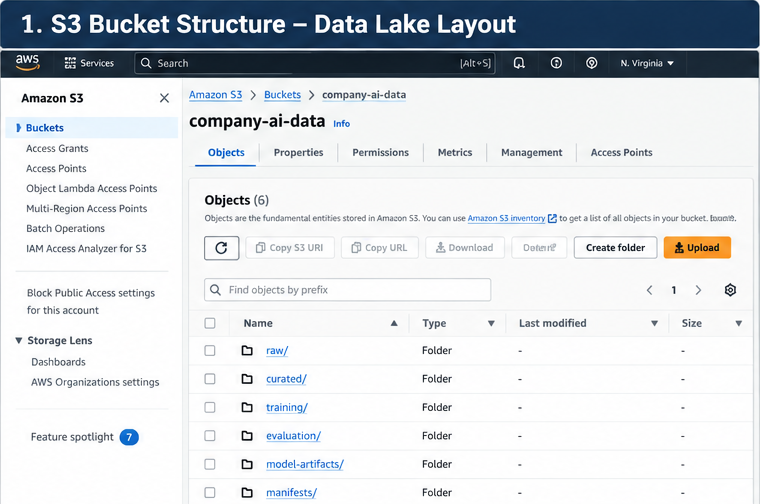
Figure 1: Separate source, curated, training, evaluation, and artifact data by purpose.
Screenshot: S3 protection and lifecycle
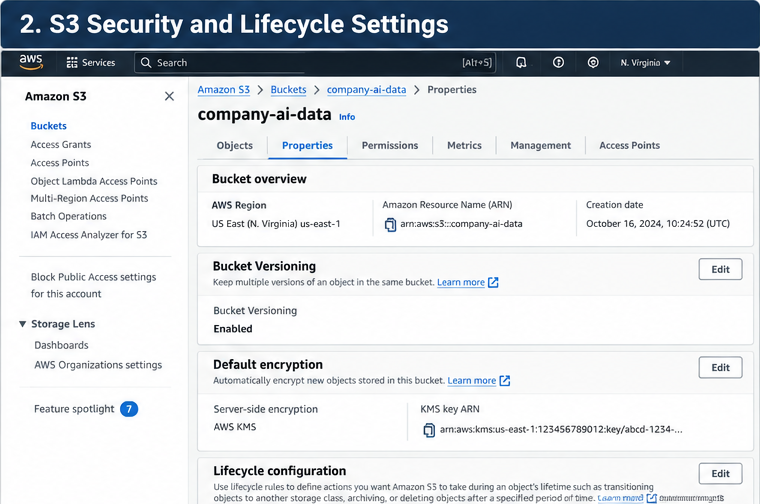
Figure 2: Bucket controls should reflect recovery, retention, encryption, and cost requirements.
2. Storage decision matrix
Service Storage model Suitable AI workloads Main trade-off
Amazon S3 Object storage Raw and curated Not a POSIX file datasets, system or training/evaluation transactional files, model database artifacts, logs,
source documents
Amazon EBS Block storage EC2-attached volumes, Attached to scratch space, compute; not a staging, low-latency shared data lake block access
Amazon EFS Managed NFS file Shared Linux files File-system system and workloads performance and requiring concurrent cost differ from file access object storage
Amazon FSx Managed file systems Workloads needing a Choose the FSx particular protocol type based on or high-performance protocol, shared file access, performance, and including selected compatibility HPC/ML pipelines
Amazon RDS / Relational database Application metadata, Usually not the Aurora labels, workflow default store for state, structured large raw operational records training datasets
Amazon Key-value/document Low-latency key Requires careful DynamoDB database lookups, inference key and metadata, job state, access-pattern online feature access design
Amazon Search and analytics Text search, hybrid Not a OpenSearch engine retrieval, and vector general-purpose Service search where its data lake or the capabilities fit default store for every embedding
Amazon Managed ML feature Consistent feature Adds a feature SageMaker Feature store management for lifecycle and Store training and schema contract; inference choose online/offline needs deliberately
Rule of thumb: use S3 for durable bulk data, databases for application queries and transactional state, EBS/EFS/FSx when compute needs block or file semantics, and OpenSearch when its search capabilities justify its operational and cost profile. Use Feature Store when shared, governed feature definitions and training/serving consistency solve a real problem.
Vector storage: choose by retrieval requirements
A vector index is generally a derived representation, not the only copy of the source content. Retain authoritative documents and metadata separately so that indexing can be repeated and deletion requirements can be propagated.
Option Consider it when Watch for
Amazon OpenSearch You need vector search Index sizing, mapping, Service alongside text search, filtering, refresh filters, or hybrid behavior, and operational retrieval cost
Amazon RDS for Embeddings belong close Vector index and query PostgreSQL / Aurora to relational records performance at target PostgreSQL with and SQL joins or scale; database sizing and pgvector transactional connection limits application data matter
Amazon S3 with a S3 is the durable S3 object storage by supported source or data-lake itself is not a drop-in, vector-capable service layer and a specific low-latency vector-query or workflow AWS capability uses it engine; verify the exact as part of a vector service and query retrieval architecture capabilities
Amazon Bedrock You want a managed RAG Supported sources, Knowledge Bases ingestion and retrieval synchronization/deletion workflow integrated behavior, permissions, and with supported data underlying vector-store sources and retrieval choice stores
Do not choose a vector store by embedding count alone. Evaluate vector dimensions, metadata filters, hybrid retrieval, update/delete frequency, latency, scale, tenancy, backup, and operational ownership.
3. Data formats and access patterns
The format affects scan cost, processing performance, schema handling, and interoperability. Choose it based on how data is written and read.
Format Strengths Good fit Trade-offs
CSV Simple, widely Small exports, simple Weak type supported, tabular interchange information; human-readable quoting and delimiter edge cases; inefficient for large analytical scans
JSON Flexible nested Raw ingestion, event Larger payloads records; common payloads, and parsing in APIs and semi-structured data overhead; schema events consistency must be managed
Parquet Columnar, typed, Curated analytical Not ideal for compressed, datasets, large hand editing or supports column training/processing frequent pruning tables single-record updates
ORC Columnar and Analytical pipelines Confirm compressed with and engines that work compatibility rich type support well with ORC with downstream services and tooling
For large analytical datasets, columnar formats such as Parquet or ORC can reduce the amount of data scanned when a job reads only selected columns. Compression can reduce storage and transfer costs, although the actual benefit depends on the data and workload.
A common pattern is to retain a permitted raw representation and publish validated, compressed columnar data for repeated analytics and training. Use partitioning only where it matches query filters. Check that the selected format and schema are supported end to end by the ingestion, processing, catalog, and training tools.
For multimodal datasets, store large binary assets such as images and audio in S3, and keep identifiers, labels, timestamps, source information, and split assignments in structured manifests or tables. Preserve the association between each asset and its annotation; do not rely on filenames alone as the only record of lineage.
4. Batch and streaming ingestion
Choose the ingestion architecture according to how quickly data must become usable and how much processing is needed before storage.
flowchart TB
    subgraph Batch["Batch ingestion"]
        SRC1["Exports and source files"] --> RAW["S3 raw zone"]
        RAW --> ETL["Glue ETL / validation"]
        ETL --> CURATED["S3 curated zone"]
        RAW --> CRAWL["Glue crawler or explicit table definitions"]
        CRAWL --> CAT["Glue Data Catalog"]
        CURATED --> CAT
        CURATED --> TRAIN["Training and evaluation pipelines"]
    end

    subgraph Streaming["Streaming ingestion"]
        EVENTS["Application / device events"] --> KDS["Kinesis Data Streams"]
        PRODUCERS["Kafka producers"] --> MSK["Amazon MSK"]
        KDS --> CONSUMERS["Stream consumers"]
        MSK --> CONSUMERS
        EVENTS --> FH["Amazon Data Firehose"]
        KDS --> FH
        FH --> S3STREAM["S3 delivery destination"]
        CONSUMERS --> ONLINE["Operational store / online access"]
    end
Batch ingestion
A typical batch pipeline lands source data in an S3 raw prefix, validates and transforms it, then publishes curated output to a separate prefix.
AWS Glue can run data integration jobs, while the Glue Data Catalog stores metadata such as table definitions, schemas, locations, and partitions. The catalog does not move or transform the underlying data. Discovering a schema also does not prove that the data satisfies business or model-quality requirements.
Use Glue crawlers when automatic schema discovery is appropriate. For stable production datasets, explicit table definitions and controlled schema changes can provide more predictable contracts.
Streaming service choices
- Amazon Kinesis Data Streams: use when applications need to consume a retained event stream, support multiple consumers, or replay records within the configured retention window.
- Amazon Data Firehose: use managed buffering and delivery to supported destinations such as S3 when the primary requirement is delivery rather than a custom stream-processing application. Firehose can receive data directly from supported producers or from configured streaming sources such as Kinesis Data Streams; confirm the supported source and destination combination for your design.
- Amazon MSK: use when the workload needs Apache Kafka APIs, existing Kafka clients/connectors, or compatibility with a Kafka-based event architecture. Account for partition design, throughput, retention, and cluster or serverless configuration.
- Amazon Managed Service for Apache Flink: consider when continuous stateful stream processing, windowing, or event-time computations are required rather than simple delivery.
These services are complementary rather than interchangeable. For example, Kinesis Data Streams can serve consumers while Firehose delivers a copy to S3 for analytics and offline training.
For production workloads, define how the pipeline handles duplicates, late-arriving events, schema changes, failed deliveries, retries, and replay. Choose a partition key that distributes traffic adequately; a hot key can limit effective throughput even when overall stream capacity appears sufficient.
Screenshot: Glue Data Catalog
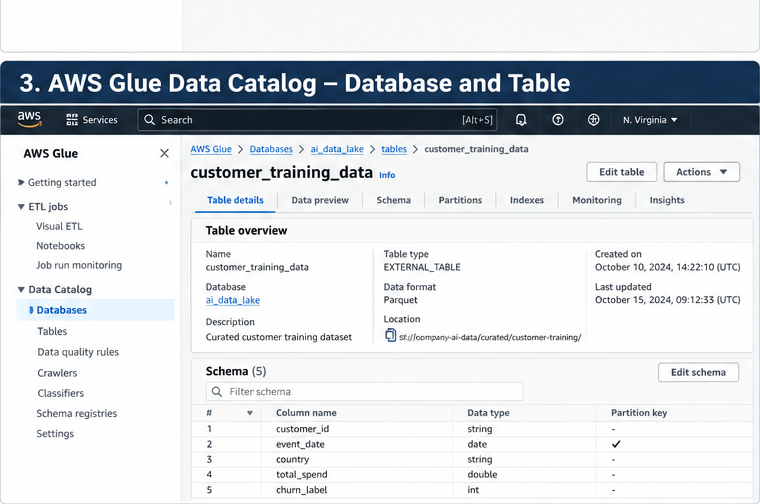
Figure 3: The Data Catalog describes the schema and location of data stored elsewhere, such as S3.
Screenshot: streaming monitoring
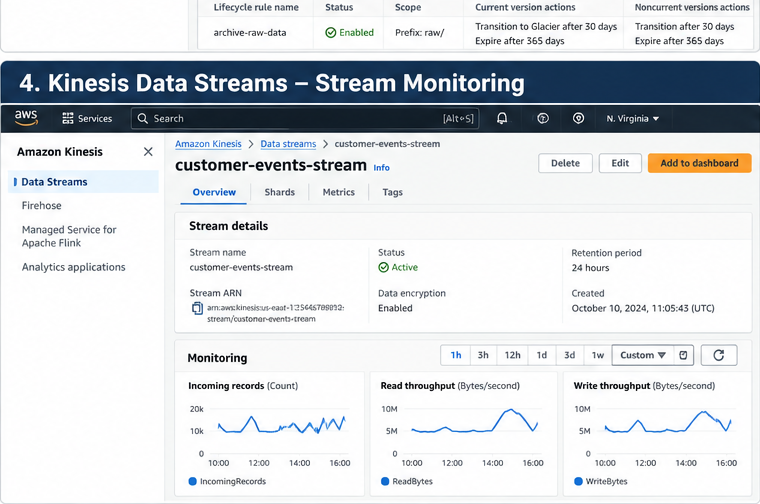
Figure 4: Monitor throughput and consumer health; investigate throttling and lag rather than assuming the stream is adequately provisioned.
5. Ingestion and storage troubleshooting
Troubleshooting starts by identifying which stage is failing: source extraction, transport, delivery, object storage, metadata discovery, or downstream processing.
Symptom Likely causes to check Useful first actions
S3 upload fails with IAM identity policy, Identify the caller AccessDenied bucket policy, KMS key role and denied action; policy, organization check object and bucket controls, or endpoint ARNs separately; policy validate KMS permissions
Upload or listing fails Client timeouts, retry Use SDK retries and for a large dataset behavior, request managed/multipart pattern, network path, upload where or inefficient appropriate; measure single-threaded before increasing transfer concurrency
Glue job cannot read Wrong S3 location, role Confirm the job role, expected objects permissions, KMS exact prefix, access, network encryption key access, configuration, or and a small malformed input representative input
Catalog schema is wrong Schema inference, Inspect the actual or stale changed source object and table structure, crawler definition; define scope, or unmanaged stable schemas and schema changes compatibility rules
Stream consumer falls Insufficient processing Check throughput, behind capacity, hot partition throttling, iterator key, slow downstream age/consumer lag, writes, or uneven partition-key traffic distribution, and downstream latency
Firehose delivery is Destination Inspect delivery error delayed or failing permissions, service metrics and logs, limits, transformation verify destination role errors, destination and KMS access, and capacity, or buffering validate record format configuration
Training run sees Mutable prefixes, Pin a dataset different data overwritten objects, version/manifest and changing source record source and exports, or missing transformation versions manifest
Storage costs rise Noncurrent object Review S3 Storage Lens unexpectedly versions, excessive or cost reports, small objects, lifecycle rules, retrieval/transition versions, and retention charges, incomplete obligations before cleanup, or duplicated deleting anything data
Do not respond to every ingestion problem by increasing capacity. First distinguish permission errors from throttling, downstream bottlenecks, schema failures, and data-quality failures. Record metrics and logs at each pipeline boundary so the failing stage is observable.
6. Combining sources and publishing curated datasets
AI datasets often combine data from multiple systems---for example, event history in S3, customer attributes in a relational database, and reference data in another export. A robust pipeline should define join keys, timestamp semantics, duplicate handling, missing-value policy, schema contracts, and the publication boundary.
Use AWS Glue for managed data integration and Spark-based distributed transformations when the workload fits. A custom Python job may be sufficient for small inputs, but it should not load an unbounded dataset into memory. For large joins and transformations, select a distributed processing approach and size it against data volume, shuffle behavior, and the target SLA.
A practical publication flow is:
- Land source extracts in separate raw prefixes.
- Validate file readability, schema, expected partitions, and required fields.
- Transform and join sources using explicit keys and timestamp rules.
- Write curated output to a new versioned location rather than overwriting the last known-good dataset.
- Publish a manifest containing source identifiers, schema version, transformation version, record counts, and validation results.
- Allow training or downstream consumers to use the new version only after validation succeeds.
Detailed transformation techniques, feature engineering, and data-quality policies belong in the companion data-processing and feature-engineering notes. This note focuses on the storage and ingestion contracts that make those workflows dependable.
7. SageMaker Feature Store: online and offline access
SageMaker Feature Store helps teams define, ingest, discover, and serve reusable ML features. It is worth considering when multiple models or services need consistent feature definitions, feature lineage, and a managed path between training and inference.
- Online store: optimized for low-latency retrieval of the latest feature values for inference or other online applications.
- Offline store: supports historical feature data and analytical access for training, evaluation, and exploration; its storage and query path differs from online serving.
- Feature groups: organize related features under a defined schema and record identifier, with event-time considerations for historical correctness.
- Ingestion design: decide how features are generated, validated, written, updated, and monitored. Define behavior for late or duplicate events and schema evolution.
- Training-serving consistency: use consistent feature definitions and appropriate point-in-time logic to reduce training/serving skew and prevent future information from leaking into historical training examples.
Feature Store is not automatically necessary for every project. For a simple one-off model with a stable batch dataset, versioned S3 data may be enough. It becomes more valuable when features are reused, online lookups are needed, or the team needs stronger controls over feature definitions and serving behavior.
8. Storage patterns for AI workloads
Data asset Suggested starting Design considerations point
Raw source data S3 raw/ prefix Preserve source payloads where permitted; record source and ingestion time
Curated training S3 curated/ or Version manifests and dataset training/ prefix schemas; partition for actual read patterns
Model artifacts S3 location used by the Restrict writes to training workflow pipeline roles; associate artifacts with run metadata
Evaluation datasets Separate S3 prefix or Restrict modifications; bucket record dataset and evaluation-code versions
Images/audio and S3 objects plus Keep stable asset IDs, annotations manifests or catalog labels, source tables metadata, and split assignments linked
Knowledge-base source S3 source-document Track ownership, documents prefix or another update/delete supported source workflows, and ingestion status
Online prediction DynamoDB or RDS/Aurora Choose based on metadata key-value versus relational access patterns
Search and retrieval OpenSearch, PostgreSQL Keep source data index with pgvector, or a separately; evaluate supported managed filtering, latency, retrieval option scale, and operational needs
Reusable online/offline SageMaker Feature Store Align feature ML features where justified definitions, event time, and training/serving requirements
Streaming events Kinesis Data Streams or Define retention, MSK, with Firehose or replay, schema consumers delivering to compatibility, and S3 idempotency
For a Bedrock knowledge base or another retrieval application, S3 can hold source documents while a separate retrieval store contains derived chunks and embeddings. Re-ingestion should be repeatable, and required deletions must propagate to derived indexes.
For traditional ML, keep training data, evaluation data, and model artifacts logically distinct. Record the exact input dataset and relevant code/configuration for each run. A model registry does not, by itself, make the original dataset immutable or reproducible.
9. IAM, bucket policies, and KMS
Use workload roles instead of long-lived access keys in code. A SageMaker job, Lambda function, ECS task, or application should receive only the permissions needed for its own prefixes and actions.
The following identity policy is an illustrative starting point for a workload that reads one dataset prefix and writes to a separate artifact prefix. Replace the bucket and prefixes with your own.
{
  "Version": "2012-10-17",
  "Statement": [
    {
      "Sid": "ReadTrainingData",
      "Effect": "Allow",
      "Action": ["s3:GetObject"],
      "Resource": "arn:aws:s3:::company-ai-data/training/churn/*"
    },
    {
      "Sid": "ListTrainingPrefix",
      "Effect": "Allow",
      "Action": ["s3:ListBucket"],
      "Resource": "arn:aws:s3:::company-ai-data",
      "Condition": {
        "StringLike": {
          "s3:prefix": [
            "training/churn",
            "training/churn/*"
          ]
        }
      }
    },
    {
      "Sid": "WriteRunArtifacts",
      "Effect": "Allow",
      "Action": ["s3:PutObject"],
      "Resource": "arn:aws:s3:::company-ai-data/model-artifacts/churn/*"
    }
  ]
}
Key details:
s3:ListBucketapplies to the bucket ARN; object actions such ass3:GetObjectands3:PutObjectapply to object ARNs.- The example permits artifact writes but not deletes. Add deletion permissions only when a defined cleanup process requires them.
- A bucket policy can enforce broader controls, such as denying non-TLS requests or restricting cross-account access.
- An explicit
Denyoverrides anAllow. A TLS-only bucket policy can deny requests whereaws:SecureTransportisfalse; test policy changes carefully to avoid disrupting required service integrations. - With SSE-KMS, the workload may need appropriate KMS permissions, and the KMS key policy must permit the intended use.
- Keep Block Public Access enabled. Consider S3 Access Points or S3 Access Grants when they simplify controlled multi-team access.
- Enable appropriate CloudTrail and S3 data-event logging when required by audit and security objectives.
10. Python example: upload and list a dataset in S3
Install the AWS SDK for Python:
For local development, use a supported credential chain such as IAM Identity Center. In AWS, prefer the workload's IAM role over embedding access keys in source code. This example assumes the bucket exists and the caller can upload to and list the selected prefix.
from pathlib import Path
import boto3
from botocore.exceptions import ClientError

BUCKET = "replace-with-your-bucket"
PREFIX = "training/churn/dataset_version=v1/"
LOCAL_DIR = Path("./data/churn")

s3 = boto3.client("s3")


def upload_dataset(local_dir: Path, bucket: str, prefix: str) -> int:
    if not local_dir.exists() or not local_dir.is_dir():
        raise ValueError(f"Dataset directory does not exist: {local_dir}")

    uploaded = 0
    for path in local_dir.rglob("*"):
        if not path.is_file():
            continue

        relative_path = path.relative_to(local_dir).as_posix()
        key = f"{prefix.rstrip('/')}/{relative_path}"

        try:
            s3.upload_file(str(path), bucket, key)
        except ClientError as exc:
            # In production, log structured error details without secrets.
            print(f"Upload failed for s3://{bucket}/{key}: {exc}")
            raise

        print(f"Uploaded s3://{bucket}/{key}")
        uploaded += 1

    return uploaded


def list_dataset(bucket: str, prefix: str) -> None:
    paginator = s3.get_paginator("list_objects_v2")
    found = False

    try:
        for page in paginator.paginate(Bucket=bucket, Prefix=prefix):
            for obj in page.get("Contents", []):
                found = True
                print(f"{obj['Key']} ({obj['Size']} bytes)")
    except ClientError as exc:
        print(f"Listing failed for s3://{bucket}/{prefix}: {exc}")
        raise

    if not found:
        print("No objects found for this prefix.")


if __name__ == "__main__":
    count = upload_dataset(LOCAL_DIR, BUCKET, PREFIX)
    print(f"Uploaded {count} files")
    list_dataset(BUCKET, PREFIX)
The paginator avoids assuming one response contains every object. upload_file supports managed multipart uploads for larger files. The example deliberately does not silently delete existing objects or implement a production data-publication protocol.
For production, add structured logging, retry/error handling appropriate to the workload, manifest generation, integrity checks, and an explicit policy for overwriting existing keys. If an operation fails, distinguish missing resources, permission failures, KMS access, throttling, and network errors rather than treating them as the same issue.
11. Versioning, lifecycle, cleanup, and cost
Deleting an object in a versioned bucket may add a delete marker while older versions continue to incur storage costs. Lifecycle rules should account for current objects, noncurrent versions, incomplete multipart uploads, and retention requirements.
Before cleanup:
- Use a dedicated development bucket or isolated prefix; never point cleanup scripts at a shared production bucket.
- Check versioning, replication, Object Lock, retention, and lifecycle configuration before deleting data.
- Set lifecycle policies for temporary uploads, intermediate data, and obsolete noncurrent versions according to approved retention requirements.
- Avoid blanket
s3:DeleteObject,s3:*, orResource: "*"permissions when narrower grants are possible. - Review storage, requests, retrieval, transitions, transfer, streaming, and logging costs.
- Configure budgets or alerts for longer-running experiments.
- Keep secrets out of object names, metadata, logs, and notebooks.
- Test permitted and denied access paths before declaring a workload secure.
12. Architecture review checklist
- [ ] Storage service matches the access pattern: object, file, block, relational, key-value, feature, or search.
- [ ] Raw and curated data are separated, with documented schema and partition strategies.
- [ ] Format choices reflect the read pattern and downstream compatibility.
- [ ] Training and evaluation datasets have traceable versions or manifests.
- [ ] Multimodal assets remain linked to their labels and metadata.
- [ ] Batch and streaming paths define failure, retry, duplicate, and replay behavior.
- [ ] Monitoring can distinguish permission failures, delivery failures, throttling, and consumer lag.
- [ ] Glue Data Catalog metadata is managed intentionally and validated against the data.
- [ ] Feature Store is used where online/offline feature needs justify it.
- [ ] Workload roles are scoped to required buckets, prefixes, actions, and KMS keys.
- [ ] Lifecycle, versioning, encryption, logging, and cleanup policies fit sensitivity and retention needs.
Key takeaways
Amazon S3 is usually the durable foundation for AI datasets and artifacts, but storage selection should follow access patterns rather than a blanket rule to store everything in S3. CSV and JSON are useful for interchange and raw payloads; Parquet and ORC often suit repeated analytical scans. Kinesis Data Streams, Data Firehose, MSK, and managed stream processing serve different needs. Glue Data Catalog makes data discoverable but does not store or validate the data. For retrieval and ML features, choose the appropriate vector or feature-serving layer while preserving source lineage, access controls, and repeatability.
References
- Amazon S3 documentation
- Amazon S3 storage classes
- Amazon S3 lifecycle management
- AWS storage services
- AWS Glue Data Catalog
- Amazon Kinesis Data Streams
- Amazon Data Firehose
- Amazon MSK
- Amazon Managed Service for Apache Flink
- Amazon SageMaker Feature Store
- Amazon OpenSearch Service vector search
- pgvector documentation
- Amazon Bedrock Knowledge Bases
- AWS IAM best practices
Enterprise AI Engineering Handbook
Building Production-Grade Enterprise AI Systems --- One Chapter at a Time.